
We went looking for one headless browser to run both our scrapers and the AI agents we build on top of them. It had to pass stealth checks, cope with CAPTCHAs, stay small in memory, render fast and run the modern web faithfully. We tested 13 of them on November 19, 2026, and none does all five. The new engines (Lightpanda, Obscura and Moli) used between 2.5 and 8 times less memory than headless Chrome, yet none of them got through a login form that Chrome handled, and Cloudflare's new Kitesurf, which we built from source, got only halfway. The stealth builds (Patchright, Zendriver, Camoufox) hid automation well and weighed as much as Chrome or more. And plain headless Chrome, the browser everyone wants to replace, rendered our pages fastest.
What follows is the lab notebook of that day, in the order things happened: what we expected, what surprised us, what broke, and how each result changed the next test. The full comparison table is at the end.
What we were looking for
Scrapers and agents want different things from a browser, and we wanted one that serves both.
A scraper runs thousands of short sessions, so it cares about memory and render speed: how many browsers fit on one server, and how long until the data is on the page. An agent clicks, types, scrolls and logs in, so it cares about fidelity: whether the browser runs the modern web the way Chrome does, layout included. Both have to get past bot detection, which means stealth (not looking automated) and, when that fails, CAPTCHAs.
Those five criteria became five rounds. Every browser went through every round, unless it could not.
The lab
One cloud VM: AMD EPYC, 8 vCPU, 15 GB of RAM, Ubuntu 24.04, no GPU, no display. Everything ran headless, on November 19, 2026.
The 13 browsers, in four families:
| Family | Browser | Version | How we drove it |
|---|---|---|---|
| Baseline | Chrome (new headless and headless shell) | Chrome for Testing 157 | Puppeteer 25.18.1, Playwright 1.65.1, Selenium 4.53.0 |
| New engines | Lightpanda | 1.0.4 | Puppeteer over CDP |
| Obscura (default and stealth builds) | 0.2.7 | Puppeteer over CDP | |
| Moli | 1.1.26 | Puppeteer over CDP | |
| Cloudflare Kitesurf | source of Nov 19, on workerd | Puppeteer over CDP, locally and on Cloudflare's playground | |
| Stealth builds | Patchright | 1.64.3 | its own Playwright API |
| Camoufox | 0.5.9, Firefox 158 | Playwright API (Python) | |
| Driver-free libraries | Zendriver | 0.17.1 | async Python over raw CDP |
| Nodriver | 0.50.99 | async Python over raw CDP | |
| Pydoll | 3.0.1 | its Playwright-compatible API | |
| Agent tooling | agent-browser | 0.43.0 | CLI with element refs |
Every Chromium-based tool drove the same binary, Chrome for Testing 157, so any difference between them comes from the tool and its launch flags, not from the Chrome version.
The pages came from scrape.li, our own public test site for scrapers. It is a React app, which is the point: most pages worth scraping today are rendered by JavaScript.
/quotes/inserts its quote cards with JavaScript after a deliberate delay of about one second./js-render/replaces a placeholder with text rendered by JavaScript./js-render/wait-for/renders a profile card after its own loading step./infinite-scroll/loads 12 products at a time as you scroll, up to 60./load-more/adds 12 products per click on a button, up to 48./loginis a form (user1 / password1) that logs you in and sets a session cookie.
Memory is the peak PSS of the browser's processes, which splits shared memory fairly between Chrome's many processes instead of counting it once per process; the Node or Python driver is excluded. Times are medians of three runs. Stealth and CAPTCHA pages are public test pages, and we only observed them: no clicks on challenges, no solvers. About 40 page loads per browser in total, most of them on scrape.li.
Kitesurf took the most work. Cloudflare open-sourced it on November 12, but there is no release binary, and the Docker image its README mentions is not public yet. We first pointed Puppeteer at the public playground on kitesurf.dev, which advertises a CDP endpoint that works "without an account". Then we built it from source: Bazel, a pinned Rust nightly and the engine's npm dependencies, 3,533 build actions and 29 minutes with four parallel jobs, for an 81 MB bundle that runs on workerd, Cloudflare's open source Workers runtime. Our first attempt, capped at 6 GB of disk, ran out of room at 78% of the build; the finished build tree weighed 7 GB. Kitesurf numbers below come from that local build unless we say playground.
Try it yourself
Run this on your own pages
Get a free API key and make your first call in minutes. 5,000 free credits for 7 days, no card.
Round 1: memory, where the marketing starts
We started where the marketing starts. Lightpanda's README promises "16x lighter" than Chromium, and memory is the number that decides how many sessions fit on a server. We loaded /quotes/ in one tab, then ten scrape.li pages in ten tabs at once.
| Browser | One page | Ten pages at once | Each extra tab |
|---|---|---|---|
| Lightpanda 1.0.4 | 47 MB | 83 MB | +4 MB |
| Obscura 0.2.7 | 70 MB | 228 MB | +18 MB |
| Moli 1.1.26 | 88 MB | 203 MB | +13 MB |
| Chrome, headless shell (Puppeteer) | 216 MB | 481 MB | +29 MB |
| Chrome, headless shell (Playwright default) | 219 MB | 513 MB | +33 MB |
| Chrome, new headless (Puppeteer) | 360 MB | 619 MB | +29 MB |
| Patchright 1.64.3 | 391 MB | 665 MB | +30 MB |
| Selenium 4.53 (with chromedriver) | 404 MB | not run | |
| Zendriver 0.17.1 | 415 MB | 646 MB | +26 MB |
| Nodriver 0.50.99 | 468 MB | 744 MB | +31 MB |
| Pydoll 3.0.1 | 518 MB | 740 MB | +25 MB |
| Kitesurf, local on workerd | 382 MB (324 MB of it the idle runtime) | 717 MB | +37 MB |
| Camoufox 158 | 889 MB | 1,703 MB | +90 MB |
The first thing the table says is that the cheapest memory win needs no new browser at all. The same Chrome binary used 216 MB in its headless shell and 360 MB in new headless mode, and the Python libraries pushed it to between 415 and 518 MB for the same page, presumably through their own launch defaults. Before switching engines, check which Chrome mode your library launches; Playwright's default is the shell, Puppeteer's is new headless.
The second thing is the slope. Chrome costs about 30 MB for every tab you add, on top of a base of 200 to 500 MB. Lightpanda added 4 MB per tab: ten pages at once took 83 MB, well under half of a single Chrome in its lightest mode. That is the scraping case for the new engines in one line, and it held on a React app, not just a static page. Camoufox sat at the other end, close to 900 MB for one page and 90 MB per extra tab.
Kitesurf needs a footnote of its own. On our server, the workerd process that hosts it used about 324 MB before it loaded anything, the engine's WebAssembly included. One page added roughly 60 MB on top of that, and each further tab 37 MB. The per-page part matches Cloudflare's own benchmark, which reports 35 to 55 MiB per render for Kitesurf against 316 to 329 MiB for a cold-started Chrome (latest run November 18, 38 pages, Chrome measured as PSS as we did). On Cloudflare that runtime is shared by everyone, so you pay for the page alone; on your own server you pay for the runtime too, which puts one local Kitesurf in Chrome's weight class.
Round 2: render speed, and a bug in our own harness
We expected the light engines to be fast as well. At start-up they were: Lightpanda, Obscura and Moli were ready to take commands in about 250 ms, Chrome in 300 to 500 ms, Camoufox in two and a half to three seconds. Lightpanda had the fastest cold start of all, 1.86 s from nothing to quotes on screen, against 2.0 to 2.3 s for Chrome.
Then we measured time to content with the browser already running, and the order flipped.
| Browser | Cold start to first quotes | /js-render/ |
/js-render/wait-for/ |
Ten tabs at once |
|---|---|---|---|---|
| Chrome, headless shell (Puppeteer) | 2,285 ms | 91 ms | 110 ms | 2,124 ms |
| Chrome, new headless (Puppeteer) | 2,304 ms | 129 ms | 134 ms | 1,995 ms |
| Zendriver | 2,115 ms | 89 ms | 124 ms | 2,861 ms |
| Nodriver | 2,180 ms | 105 ms | 116 ms | 2,930 ms |
| Playwright (headless shell) | 1,979 ms | 129 ms | 163 ms | 2,100 ms |
| Patchright | 2,162 ms | 210 ms | 186 ms | 1,807 ms |
| Pydoll | 2,575 ms | 222 ms | 239 ms | 2,638 ms |
| Camoufox | 7,562 ms | 234 ms | 259 ms | 10,364 ms |
| Lightpanda | 1,859 ms | 324 ms | 377 ms | 1,865 ms |
| Moli | 2,116 ms | 356 ms | 405 ms | 2,732 ms |
| Obscura | 2,313 ms | 495 ms | 509 ms | 6,411 ms |
| Kitesurf, local | 2,742 ms | 778 ms | 785 ms | 7,391 ms |
| Kitesurf, Cloudflare playground | 3,987 ms | 1,111 ms | 1,122 ms | not run |
Cold start includes the browser launch and the page's own one-second delay. The page columns are warm medians of three loads. The playground's times include round trips between our server and Cloudflare.
Warm, Chrome rendered our React pages about 2.5 to 5.5 times faster than Lightpanda, Moli and Obscura: 91 to 134 ms against 324 to 509 ms. Kitesurf was slower still at 778 ms; Cloudflare's own benchmark has it about 1.7 times slower than Chromium on screenshots, and on our React pages the gap was wider. Whatever drove it, Puppeteer, Zendriver or Nodriver, Chrome stayed in the same band. Our reading is that the new engines run the same V8 but implement the DOM and the event loop themselves, and a React app spends its time exactly there. Lightpanda's advantage is real when you pay for many cold starts, or many tabs: its ten-tab batch took 1.87 s, level with the fastest Chrome runs. Obscura and Kitesurf took 6.4 and 7.4 s for the same ten tabs, two to three times longer than everything else except Camoufox. We did not dig into why.
The ten-tab test also caught us out. Our first run reported that headless Chrome rendered only 1 page out of 10 within 30 seconds. The pages were fine; the tabs we inspected had all rendered their content. The harness was wrong: Puppeteer's waitForFunction re-checks its condition on every animation frame by default, and Chrome does not run animation frames in background tabs. Nine of our ten tabs were in the background, so the check never ran again. Polling on a timer fixed it, and the same fix went into every other harness:
// default polling is 'raf': never fires in a background tab
await page.waitForFunction(() => document.querySelectorAll('.quote-card').length > 0, { polling: 50 });
If you run several pages per browser, this is worth checking in your own code.
Round 3: does it run the modern web?
Speed and memory mean little if the page renders wrong. We ran three kinds of checks: a script that tests 28 JavaScript features (from ES2022 class syntax and structuredClone to IntersectionObserver, custom elements with shadow DOM, canvas, WebGL, Intl, workers and WebAssembly), a small CSS page of our own with 11 layout and style probes, and the three interactive pages.
| Browser | JS features (28) | What was missing | CSS probes (11) | Infinite scroll | Load more | Login |
|---|---|---|---|---|---|---|
| Chrome (Puppeteer, Playwright, Zendriver, Nodriver) | 28 | nothing | 11 | 60 of 60 | 48 of 48 | yes |
| Patchright | 27 | custom elements, inside its isolated world | 11 | 60 | 48 | yes |
| Pydoll | 28 | nothing | 11 | 60 | its click timed out | yes |
| Camoufox | 26 | canvas readback (randomized on purpose), WebGL | 11 | 60 | 48 | yes |
| Obscura | 27 | WebGL | 10 | 60 | 48 | no |
| Moli | 27 | IntersectionObserver |
8 | stuck at 12 | 48 with a DOM click | no |
| Kitesurf, local | 27 | WebGL | 10 | 60 | 48 | half: page yes, cookie no |
| Lightpanda | 25 | canvas, WebGL, workers (off by default) | 1 | 60 | 48 with a DOM click | no |
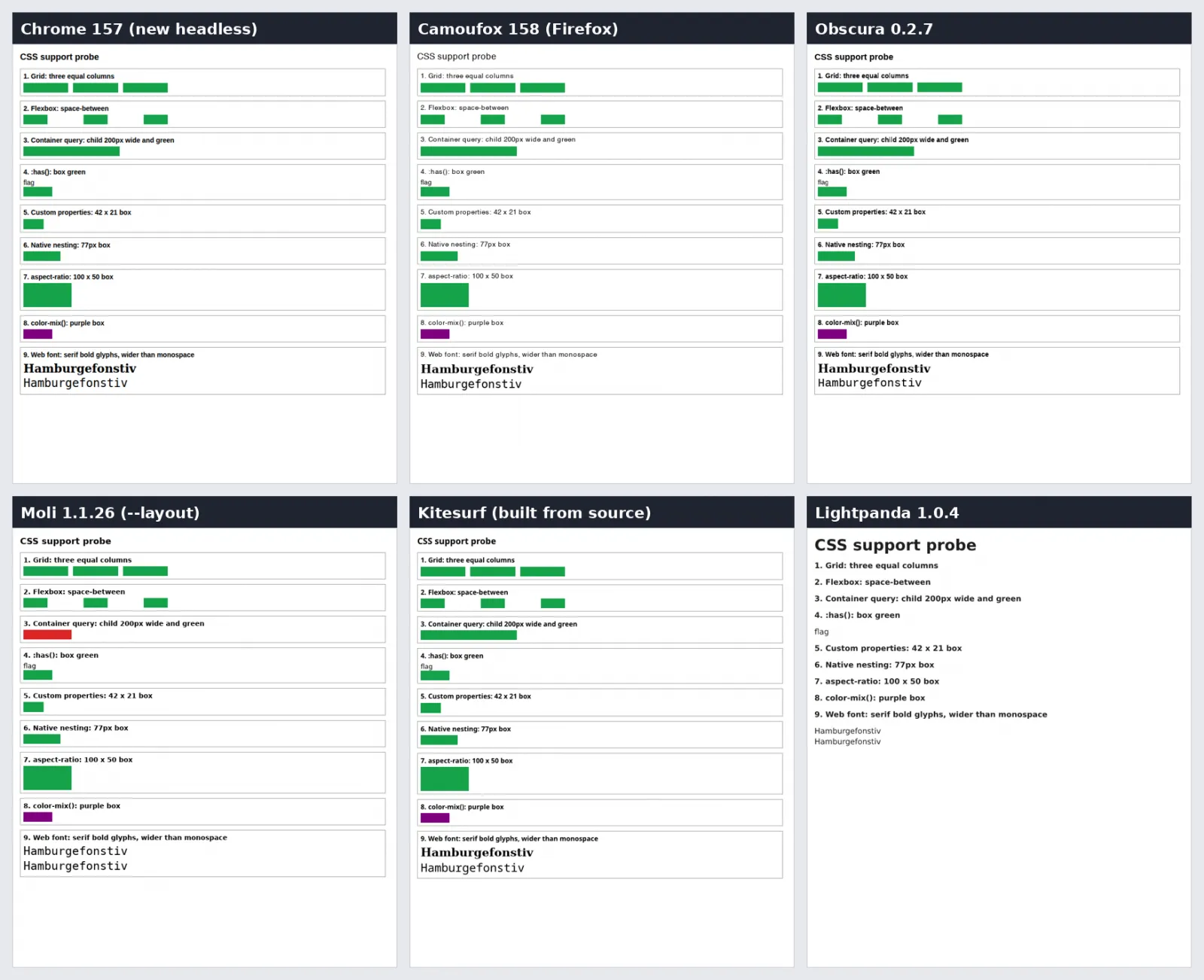 Our CSS probe page in six engines. Green boxes mean the feature worked. Moli's container query stays red, Moli did not draw the web font, and Lightpanda has no layout at all.
The CSS picture was better than we expected. Obscura and Kitesurf laid out grid, flexbox, container queries, :has(), native nesting, aspect-ratio and color-mix() as Chrome did. Their only miss was the font API: both drew our web font, but document.fonts reported it as not loaded. Moli missed container queries and the font. Lightpanda has no layout engine, so every geometry probe failed by design, and its computed styles ignored :has() and custom properties too; its screenshot is a text rendering of the page.
The interactions were where the differences turned into failures, and each one had a cause we could point to.
Moli's infinite scroll stopped at 12 products. The feature script had already told us why: Moli has no IntersectionObserver, and that is what the page uses to notice you reached the bottom. A 27 out of 28 score sounds fine until the missing one is the one your page needs.
Lightpanda and Moli could not click the "Load more" button through Puppeteer. Puppeteer's click() asks the browser where the element is on screen and sends a mouse event there; an engine without full layout cannot answer. A DOM click from JavaScript needs no geometry, and it worked:
import { spawn } from 'node:child_process';
import puppeteer from 'puppeteer-core';

const lp = spawn('./lightpanda', ['serve', '--port', '9222']);
await new Promise((r) => setTimeout(r, 300));
const browser = await puppeteer.connect({ browserWSEndpoint: 'ws://127.0.0.1:9222' });
const page = await browser.newPage();
await page.goto('https://scrape.li/load-more/');
await page.waitForSelector('.product-card');
const button = () => page.evaluateHandle(() => [...document.querySelectorAll('button')].find((b) => /load more/i.test(b.textContent)));

try { await (await button()).click(); }                  // Puppeteer's click needs a box model
catch (e) { console.log('page click:', e.message); }
await (await button()).evaluate((b) => b.click());     // a DOM click does not
await page.waitForFunction(() => document.querySelectorAll('.product-card').length > 12, { polling: 50 });
console.log('cards:', await page.$$eval('.product-card', (c) => c.length));
await browser.disconnect();
lp.kill();
page click: Node is either not clickable or not an Element
cards: 24
Repeated until the button disappeared, the DOM click took both engines to all 48 products.
The new engines could not log in. The scrape.li login happens entirely in the page's JavaScript: no request leaves the page, the app checks the credentials, sets a cookie and renders a profile. Chrome, Camoufox and every Chrome-based library we ran it with did it. Lightpanda, Obscura and Moli failed, both with simulated typing and with fields filled from JavaScript, while the same JavaScript-filled login worked in Chrome. Kitesurf got halfway: our local build rendered the logged-in profile, but the session cookie never appeared in its cookie store, and on Cloudflare's playground the form disappeared after the first keystrokes. We did not find the root causes, and this is the kind of failure that matters most for agents: nothing errors, the page just never changes.
Three smaller findings belong here. The same Kitesurf scored 27 locally but 25 on Cloudflare's playground, where structuredClone of a date and WebAssembly from a byte array failed: its Docker setup notes that evaluation runs on V8 only in a local runtime and on Boa, a JavaScript engine written in Rust, on Cloudflare. Patchright's stealth design runs your page.evaluate() code in an isolated world, and in that world window.customElements does not exist, so our custom-elements check failed there and nowhere else. And Camoufox "failed" our canvas check on purpose: when its fake identity claims a different operating system than the machine, it returns random canvas pixels, and it says so itself with a warning that "the browser reads as a privacy-hardened Firefox".
Round 4: stealth
Now the round that most of these projects were built for. We loaded three public detection pages in each browser: bot.sannysoft.com, the rebrowser bot detector (which looks for side effects of automation protocols, such as the Runtime.enable leak) and CreepJS (which scores how headless a browser looks). Then tls.peet.ws, to see whether the TLS and HTTP/2 handshake matches the browser the User-Agent claims.
| Browser | Claims to be | sannysoft checks failed | rebrowser flags | CreepJS "headless" | Handshake matches the claim |
|---|---|---|---|---|---|
| Chrome, new headless (Puppeteer) | HeadlessChrome 157, Linux | 5 of 31 | 8 | 100% | yes |
| Chrome, headless shell (Playwright) | HeadlessChrome 157, Linux | 12 of 30 | 9 | 100% | yes |
| Selenium 4.53 | HeadlessChrome 157, Linux | 5 of 31 | not run | 100% | not run |
| Patchright | HeadlessChrome 157, Linux | 4 of 31 | 4 | 67% | yes |
| Pydoll | HeadlessChrome 157, Linux | 4 of 31 | 3 | 67% | yes |
| Nodriver | HeadlessChrome 157, Linux | 4 of 31 | 2 | 67% | yes |
| Zendriver | Chrome 157, Linux | 1 of 31 | 3 | 33% | yes |
| Camoufox | Firefox 158 on Windows | 3 of 30 | 0 | 0% | yes, identical to stock Firefox 160 |
| Lightpanda | Lightpanda/1.0 | 7 of 30 | 8 | 0% | it claims nothing else |
| Obscura, default build | Chrome 143 on Windows | 3 of 30 | 7 | 0% (20% "stealth") | no: not Chrome, HTTP/1.1 |
| Obscura, stealth build | Chrome 145 on Windows | 3 of 30 | 7 | 0% (20% "stealth") | close to Chrome |
| Moli | Chrome 156 on Windows | 0 of 30 | 5 | page never rendered | no |
| Kitesurf, local | Kitesurf/0.0.1, webdriver on | 6 of 28 | 5 | no result | it claims nothing else |
Plain headless Chrome leaks everywhere: navigator.webdriver is true, the User-Agent says HeadlessChrome, and CreepJS rates it 100% headless no matter which library launches it. The stealth tools each fix a different layer, and the import-swap test shows Patchright's layer best:
import { chromium } from 'patchright';            // was: import { chromium } from 'playwright';

const browser = await chromium.launch({ executablePath: process.env.CHROME });   // Chrome for Testing 157
const page = await browser.newPage();
await page.goto('https://bot-detector.rebrowser.net/');
await page.evaluate(() => document.getElementById('detections-json'));
await page.waitForTimeout(3000);
const rows = JSON.parse(await page.evaluate(() => document.getElementById('detections-json').value));
console.log('flagged:', [...new Set(rows.filter((r) => r.rating > 0).map((r) => r.type))].join(', '));
console.log('customElements in evaluate():', await page.evaluate(() => typeof window.customElements?.define));
await browser.close();
# playwright 1.65.1
flagged: sourceUrlLeak, runtimeEnableLeak, navigatorWebdriver, viewport, popupBlocking, ipcFloodingProtection, useragent, headless, storagePartitioning
customElements in evaluate(): function
# patchright 1.64.3
flagged: viewport, useragent, headless, storagePartitioning
customElements in evaluate(): undefined
Patchright removed every protocol leak and left the browser as it was: the User-Agent still says HeadlessChrome. Nodriver and Pydoll, which talk to Chrome over raw CDP with no driver in between, got to the same place. Zendriver went one step further and rewrote the User-Agent, which gave it the best Chromium scores in the test. Camoufox was the cleanest of all, with nothing flagged by rebrowser and 0% on CreepJS, because its fingerprint is spoofed inside the Firefox engine rather than patched in JavaScript. In our stealth run it presented itself as Firefox 158 on Windows from a Linux server, and its TLS and HTTP/2 fingerprint was identical to stock Firefox 160's.
The new engines split in two. Lightpanda and Kitesurf do not try: Lightpanda refuses any User-Agent containing "Mozilla", and Cloudflare says Browser Run traffic is "always identified as bot traffic". Obscura and Moli present themselves as Chrome on Windows, and that is where the handshake check matters. Moli passed all 30 sannysoft checks, the only browser to do so, while its TLS handshake looked nothing like Chrome's. Obscura's default build spoke HTTP/1.1, which Chrome does not do with a server that offers HTTP/2. Its stealth build fixed the network layer, with the same cipher and HTTP/2 fingerprint as our Chrome, but CreepJS still caught its JavaScript overrides and scored it "20% stealth", which is CreepJS for "lies detected". A server-side detector compares what a browser claims with how it connects before any JavaScript runs, so a Chrome User-Agent on a non-Chrome handshake is worse than an honest name.
One more thing surprised us here. The same Chrome binary produced two different TLS fingerprints: 18 TLS extensions when Puppeteer or the Python libraries launched it, 17 when Playwright or Patchright did. Launch flags reach all the way into the handshake.
Round 5: CAPTCHAs
We do not solve CAPTCHAs, and we did not try. We loaded three public demo pages in each browser, waited, and recorded what we saw.
| Browser | reCAPTCHA v3 demo score | Turnstile with Cloudflare's test key | Turnstile, managed mode, real key |
|---|---|---|---|
| Chrome via Puppeteer, Playwright or Pydoll | 0.9 | token | no token: checkbox shown |
| Zendriver, Nodriver | 0.9 | token | no token |
| Patchright | 0.9 | token | no token: checkbox shown |
| Camoufox | 0.9 | token | no token: checkbox shown |
| Moli | 0.9 | token | no token: checkbox shown |
| Obscura (both builds) | no score after 15 s | token | no token: widget never appeared |
| Lightpanda | no score after 15 s | no token | no token: widget never appeared |
| Kitesurf (local and playground) | no score after 15 s | no token | no token: widget never appeared |
The first surprise was the reCAPTCHA score: 0.9, the top of the scale, for plain headless Chrome with navigator.webdriver set to true, from a datacenter IP. That says more about the demo than about the browser. The second was Cloudflare's own Turnstile demo. Every Chrome-based browser passed it invisibly, until we read its source and found it uses Cloudflare's documented test key, which always passes. On a demo, a token only proves that the widget's script ran. So we added a public test page that uses a real key in managed mode, where Cloudflare decides whether to challenge. No browser got a token without a click, stealth builds included; in every screenshot where the widget appeared, it was showing its "Verify you are human" checkbox.
What the CAPTCHA round really measured is whether a browser can run the vendor's script at all. The Chrome family, Camoufox and, impressively, Moli could; Obscura only half; Lightpanda and Kitesurf not at all. Beyond that, passing depends on things a browser does not control: the reputation of your IP, how you behave over time, and how strict the site has set its challenge. That is why the hosted browser clouds sell CAPTCHA solving and residential proxies as part of the package, and why no browser in this test can promise you a pass.
Agents: the control layer matters as much as the engine
An agent does not want to write CSS selectors. Vercel's agent-browser (0.43.0) gives it a snapshot of the page as a short list of elements with refs, and the agent acts on the refs. On the load-more page it found the button and clicked it until it was gone:
agent-browser --args "--no-sandbox" open https://scrape.li/load-more/
agent-browser snapshot -i            # lists the page's elements, the button included
agent-browser click @e26             # the "Load more" button's ref
agent-browser get count .product-card
Our loop around those commands printed:
round 1: clicked @e26, cards=24
round 2: clicked @e26, cards=36
round 3: clicked @e26, cards=48
round 4: no Load more button in the snapshot
The same CLI can swap its engine. With Chrome the daemon and browser used 506 MB; with --engine lightpanda they used 60 MB, and the same three clicks worked, even though Puppeteer's own click had failed on Lightpanda. For agents that mostly read, that pairing is the most efficient setup we found. For agents that log in, the login round says to keep Chrome.
If you would rather rent the browser: the hosted clouds
Running browsers is a job in itself, and a crop of hosted clouds now rents them by the hour. All of them hand you a CDP WebSocket URL, so the code above works with a changed connect() line. We did not sign up for any of them; these figures come from their pricing pages and docs on November 19, 2026.
| Service | Entry plan | Browser time | Concurrency | Session limit | Stealth and CAPTCHA (as documented) |
|---|---|---|---|---|---|
| Browserbase | Free (1 h); Developer $20/month | 100 h, then $0.12/h | 3 free, 25 Developer | 15 min free, 6 h max | basic stealth and CAPTCHA solving on paid plans |
| Steel | $0 plus usage | $0.10/h | 10 | 15 min (1 h on Scale) | stealth fork on Enterprise; CAPTCHA $3 per 1,000 |
| Hyperbrowser | Free 5,000 credits; $30/month | $0.10/h | 1 free, 25 | up to 720 min | basic stealth and CAPTCHA on paid plans |
| Kernel | free plus usage, $5/month credits | about $0.06/h headless, per second | 5 free | up to 72 h | stealth mode with proxy and CAPTCHA solver |
| Anchor | Free ($5/month credits); $50/month | $0.05/h plus $0.01 per browser | 5 free, 25 | 3 h default, no upper limit | CAPTCHA from Starter; full stealth on Growth |
| Browser Use Cloud | pay as you go | $0.06/h, per minute | 10, rising with spend | 4 h | stealth Chromium fork by default; CAPTCHA included |
| Cloudflare Browser Run | Workers Free or Paid | 10 h/month on Paid, then $0.09/h | 3 free, 10 included on Paid | no fixed maximum while active | none: always identified as a bot |
| Lightpanda Cloud | free, 10 h/month | $19/month for 300 h, then $0.08/h | 5 free, 30 | not stated | none, by design |
Proxy traffic is billed separately on most of them, from $5/GB to $12/GB.
The verdict, goal by goal
If stealth matters most, Camoufox was the cleanest browser we tested, with nothing flagged and 0% headless, but it costs close to 900 MB per page and seven and a half seconds to its first page. Zendriver is the Chrome-based alternative, with a real Chrome handshake and the best Chromium scores; Patchright is the easiest switch if you already have Playwright code. None of them changes your IP address, and none got through a real managed challenge without a click.
If CAPTCHAs matter most, no browser is the answer. Use a full engine (Chrome, Firefox or Moli) so the challenge script runs at all, then work on IP reputation and pacing, or pay a hosted cloud whose plan includes solving.
If memory matters most, Lightpanda: 47 MB for one React page and 4 MB for each extra tab. Keep a Chrome fallback for logins, screenshots and anything visual. Before you switch engines, though, try Chrome's headless shell: it cut Chrome's footprint from 360 to 216 MB on its own.
If render speed matters most, warm Chrome won: 91 to 134 ms on our React pages, against 324 ms and more for the new engines. Of the new engines, only Lightpanda wins anything here: the fastest cold start, and parity with Chrome on a batch of ten tabs.
If faithful rendering matters most, Chrome or Camoufox, the only engines that passed every CSS probe and every interaction. Obscura and Kitesurf render CSS remarkably well for their age, but Obscura could not log in and Kitesurf only half did.
If you are building an AI agent, separate the control layer from the engine: agent-browser or Playwright MCP on top, Chrome underneath for anything with forms and logins, Lightpanda for agents that only read.
If you would rather not run browsers at all
Every option above still leaves you running browsers, proxies and retries. If what you need is the rendered page and not the browser, Ujeebu's Scrape API does it in one HTTP call. It renders the page in headless Chrome when you set js=true, waits for a selector or a delay, can scroll infinite pages (scroll_down) or run your own script in the page (custom_js), routes the request through rotating, premium or residential proxies, and returns the HTML, a screenshot or a PDF. Blocked, timed-out and failed requests are not billed. For agents, the Markdown API returns pages as clean Markdown, and the MCP server exposes the same calls as tools.
curl "https://api.ujeebu.com/scrape?url=https://scrape.li/load-more/&js=true&wait_for=.product-card" \
  -H "ApiKey: YOUR_API_KEY"
All parameters are in the Scrape API docs, and plans are on the pricing page.
Comparison table
Tested on November 19, 2026, on scrape.li and public detection pages; hosted services from their public docs and pricing on the same day. Memory is for one page and for ten pages at once.
| Browser | Engine | Open source | How you drive it | Memory (1 / 10 pages) | JS (28) / CSS (11) | Screenshots / PDF |
|---|---|---|---|---|---|---|
| Chrome + Puppeteer 25.18 | Chrome 157 | Apache-2.0 | own API, CDP | 216 / 481 MB (shell), 360 / 619 MB (new) | 28 / 11 | yes / yes |
| Chrome + Playwright 1.65 | Chrome 157 | Apache-2.0 | own API, MCP | 219 / 513 MB (shell) | 28 / 11 | yes / yes |
| Chrome + Selenium 4.53 | Chrome 157 | Apache-2.0 | WebDriver, BiDi | 404 MB | not run | viewport / yes |
| Lightpanda 1.0.4 | own (Zig, V8) | AGPL-3.0 | CDP, BiDi, MCP | 47 / 83 MB | 25 / 1 | text only / text only |
| Obscura 0.2.7 | own (Rust, V8) | Apache-2.0 | CDP | 70 / 228 MB | 27 / 10 | yes / yes |
| Moli 1.1.26 | own (Rust) | Apache-2.0 | CDP, WebDriver, BiDi | 88 / 203 MB | 27 / 8 | yes, with layout on / yes |
| Cloudflare Kitesurf | own (Rust, Wasm) | Apache-2.0 | CDP, REST | 382 / 717 MB locally (324 MB is the runtime) | 27 / 10 | yes / yes |
| Patchright 1.64 | Chrome 157 | Apache-2.0 | Playwright API | 391 / 665 MB | 27 / 11 | yes / yes |
| Camoufox 158 | Firefox | MPL-2.0, MIT | Playwright only | 889 / 1,703 MB | 26 / 11 | yes / no |
| Zendriver 0.17.1 | Chrome 157 | AGPL-3.0 | async Python, CDP | 415 / 646 MB | 28 / 11 | yes / yes |
| Nodriver 0.50.99 | Chrome 157 | AGPL-3.0 | async Python, CDP | 468 / 744 MB | 28 / 11 | yes / no built-in PDF |
| Pydoll 3.0.1 | Chrome 157 | MIT | Playwright-style API | 518 / 740 MB | 28 / 11 | yes / yes |
| agent-browser 0.43 | Chrome or Lightpanda | Apache-2.0 | CLI, refs, MCP | 506 MB (Chrome), 60 MB (Lightpanda) | engine's | yes / yes |
| Browser | Stealth approach | CAPTCHA demos (observed) | Login worked | Best for |
|---|---|---|---|---|
| Chrome + Puppeteer or Playwright | none built in | reCAPTCHA 0.9; managed Turnstile: checkbox | yes | reliable rendering, speed when warm |
| Chrome + Selenium | none built in | not run | not run | existing Selenium code |
| Lightpanda | none; identifies itself, supports Web Bot Auth | no score, no widget | no | many cheap sessions on pages that do not fight bots |
| Obscura | optional stealth build (fingerprint, TLS) | no score; widget only on the test key | no | light rendering with screenshots, experiments |
| Moli | Chrome User-Agent by default | reCAPTCHA 0.9; checkbox | no | light rendering over WebDriver or BiDi |
| Cloudflare Kitesurf | none; always identified as a bot | no score, no widget | half: page yes, cookie no | declared agents on Cloudflare, your own sites |
| Patchright | removes CDP and automation leaks | reCAPTCHA 0.9; checkbox | yes | Playwright code that gets flagged |
| Camoufox | fingerprint spoofed inside Firefox | reCAPTCHA 0.9; checkbox | yes | strict fingerprinting, low volume |
| Zendriver | no WebDriver, no Runtime.enable, no HeadlessChrome |
reCAPTCHA 0.9; checkbox | yes | Python scrapers that need a quiet Chrome |
| Nodriver | no WebDriver, no Runtime.enable |
reCAPTCHA 0.9; checkbox | yes | the same, upstream of Zendriver |
| Pydoll | no WebDriver leaks, fingerprint helpers | reCAPTCHA 0.9; checkbox | yes | Python with Playwright-style code |
| agent-browser | none of its own | engine's | engine's | coding agents driving a browser |
FAQ
What is the best headless browser for web scraping in 2026?
It depends on what you optimize. In our tests Lightpanda used the least memory (47 MB per page, 4 MB per extra tab), warm Chrome rendered fastest, and Camoufox and Zendriver looked least automated. For pages with logins or complex interactions, a Chrome-based setup was the only reliable choice.
Is Lightpanda a replacement for Chrome?
For reading JavaScript pages at scale, often. It rendered our React pages, scrolled an infinite list and, with a DOM click, loaded more content. But it has no layout engine, so screenshots are text renderings, Puppeteer's mouse clicks fail, and it could not complete a JavaScript login that Chrome handled.
Can Puppeteer and Playwright drive the new browsers?
Yes. Lightpanda, Obscura, Moli and Kitesurf all accepted stock Puppeteer over CDP, and every hosted cloud we looked at hands you a CDP endpoint. Engines without full layout reject Puppeteer's click(); a click from JavaScript works.
Do stealth browsers get past CAPTCHAs?
Not on their own. On a real Turnstile key in managed mode, every browser we tested, stealth builds included, was shown the "Verify you are human" checkbox. Stealth builds remove the signals that test pages check; passing a real challenge also depends on your IP reputation, your behavior and the site's settings.
What is Cloudflare's headless browser?
Cloudflare runs Chrome as a service called Browser Run (formerly Browser Rendering), and since August 2026 it also has its own engine, Kitesurf, which runs in V8 isolates on Workers and was open-sourced in November. Browser Run identifies its traffic as bot traffic. We built Kitesurf from source and ran it locally: it rendered CSS almost like Chrome and added about 60 MB per page on top of a 324 MB runtime, but it was the slowest engine on our React pages and completed our login only halfway.
Try it yourself
Run this on your own pages
Get a free API key and make your first call in minutes. 5,000 free credits for 7 days, no card.