

Scraping API pricing falls into a handful of distinct models, and the one that saves you money depends on your workload mix, not the headline rate. Imagine your scraper ran 10,000 requests last month and the bill was fine. This month you added JavaScript rendering to half of them and the bill doubled, even though you sent the same number of requests. That is per-request pricing working exactly as designed. This guide gives you the credit math to predict your real monthly spend before you commit to any plan.
Scraping API pricing models explained
Most scraping APIs sell one of six billing models, and many combine two of them. Knowing which meter a provider uses is the first step, because comparing headline rates across different models is like comparing a taxi fare to a car-rental day rate. List your monthly request counts by type before you look at any pricing page.
- Concurrent scraper slots (capacity model): you pay a fixed monthly fee for a number of simultaneous scraping jobs. The fee is the same whether those slots run flat-out or sit idle. Web Scraper Scale is the clearest example: unlimited URL credits do not mean unlimited throughput, because the concurrent slot count is the real ceiling.
- Per-request or per-page credits: each API call deducts one or more credits from a monthly allowance. The twist is that configuration changes the cost: a plain HTML fetch costs fewer credits than the same request with JavaScript rendering or a premium proxy. ScraperAPI charges 1 credit for a standard page, 5 for Amazon, 25 for Google, and adds 10 credits per request when bypassing Cloudflare or Datadome.
- Credit pool with mode-based costs: a pre-purchased block of credits that all endpoints draw from, with each request type assigned a fixed credit cost. This is the model most developer-facing APIs use today. Credit configurations are alternative modes, not additive charges: ScrapingBee charges 1 credit for a basic request, 5 with JavaScript, 10 premium, 25 premium-plus-JavaScript, or 75 for stealth mode. You pay one of those amounts per request, not their sum.
- Delivered records: billed per output row rather than per page loaded. Bright Data's Web Scraper API charges $1.50 per 1,000 successfully delivered records for supported collections. One page load can yield zero, one, or many records depending on scraper logic, which makes this model hard to compare directly until you know your yield rate.
- Compute or browser time: billed by memory-seconds of actor runtime or session minutes. This suits complex multi-step crawls where the bottleneck is processing time rather than page count, but it requires you to estimate runtime before you can compare it to a per-request rate. If you cannot estimate runtime, prefer a credit model with a per-request cap.
- Proxy bandwidth: billed per gigabyte transferred through residential or mobile proxy networks, often as a separate meter on top of a request-based plan. Raw residential proxy access is the common case here.
The practical step before comparing prices: identify which meter each provider uses, then map your monthly request counts to that meter. A low per-request rate on a capacity plan is meaningless if your volume leaves slots idle half the month.
Why the headline rate tells you almost nothing
The published rate is only the starting point. Three factors determine what you actually pay: utilization, workload mix, and how the provider defines a billable success.
Utilization matters most on capacity plans. Web Scraper Scale's $200 monthly plan becomes $0.20 per 1,000 URLs at 1 million URLs processed, but $2 per 1,000 at 100,000 URLs. The formula is simple: monthly cost divided by URLs actually completed, times 1,000. At low utilization, the rate per URL rises sharply.
Workload mix matters most on credit plans. On a Decodo $99 plan, standard-proxy requests cost $0.14 per 1,000 while premium-plus-JavaScript requests cost $1.20 per 1,000, an eightfold difference within the same monthly budget.
The definition of "success" changes your effective failure cost. A 200 OK response can contain a CAPTCHA page, a consent wall, or a wrong-region redirect. Some providers do not charge for unsuccessful attempts; others charge for any 200 response; others charge when a document is returned regardless of content quality. On a platform that bills any 200, a site that returns soft-block pages will drain your credits even when your scraper gets no usable data.
The practical check: calculate effective cost by dividing your actual monthly spend by the URLs from which you extracted usable data, not by the requests you sent.
Try it yourself
Run this on your own pages
Get a free API key and make your first call in minutes. 5,000 free credits for 7 days, no card.
How page structure multiplies your real request count
One detail that pricing pages never show: the number of requests you send depends on how you traverse a site, not just how many records you want.
Take 50 catalogue pages, each containing 40 product cards. If every required field appears on the listing page, 50 page loads produce 2,000 candidate rows. If you need to open each product detail page, the same 2,000 rows require roughly 2,050 page loads. On a credit model, that difference is a 41x increase in credit consumption for the same dataset.
Before you estimate your monthly credit burn, map the scraping route: listing-only or listing-plus-detail. The answer changes your cost estimate more than the difference between most competing plans. Always test the least costly route first and verify it actually returns usable data. A plain scrape that returns a bot-block page is not cheaper than a JavaScript scrape that works; it is a wasted credit.
Per-request pricing: predictable only when every request is identical
Per-request pricing charges a fixed rate per API call, but that rate typically varies by request type. Teams with uniform, predictable workloads where every call costs the same amount find it easy to budget.
The model breaks down when workloads diversify. Adding JavaScript rendering or premium proxies mid-month can double a bill without changing request count, because each option carries a higher per-request rate. Teams running mixed workloads, say, plain HTML fetches for sitemaps, JS-rendered pages for product listings, and SERP lookups for keyword monitoring, find per-request billing hard to budget. The cost of a campaign spike is also unpredictable: you know how many requests you will send, but the mix of request types may shift as you hit more bot-protected pages.
The alternative is a credit pool: you pre-buy a block of credits and spend them across any mix of request types. Per-request pricing is predictable only when every request is identical. As soon as your workload diversifies, a credit pool gives you more control over monthly spend.
Credit-pool pricing: how it works and what it actually costs
A credit pool is a pre-purchased block from which every request draws a fixed number of credits based on its type. Think of it like a prepaid phone plan where a text costs 1 unit, a local call costs 5, and an international call costs 25: you buy the balance once and spend it however you need.
Firecrawl charges 1 credit per basic page scrape and adds 4 credits when you request JSON extraction output, making the output format an additive cost on top of the base request. At full utilization of Firecrawl's Standard plan (100,000 credits for $83/month), a basic scrape costs $0.83 per 1,000 pages. Firecrawl charges 2 credits per SERP result per their pricing page.
Ujeebu uses the same model. Credit costs per successful request are: plain scrape 1 credit, JavaScript rendering 5 credits, premium proxy 8 credits, SERP 5 credits, Markdown conversion 10 credits, PDF extraction 10 credits, AI scraper 20 credits, and scrape with premium proxy plus JS 25 credits. The full schedule is on the pricing page. Plans run from Starter at $49/month for 300,000 credits to Business at $999/month for 15,000,000 credits, with annual billing saving 10%.
Here is what that means in credit terms for a mixed workload on the Growth plan (1,000,000 credits at $119/month):
- 100,000 plain scrapes consume 100,000 credits
- 100,000 JavaScript scrapes consume 500,000 credits
- 20,000 SERP requests consume 100,000 credits
That totals 700,000 credits, comfortably within the Growth plan's 1,000,000 credit allowance. The cost per 1,000 plain scrapes ranges from $0.16 on the Starter plan to $0.07 on Business; for JavaScript scrapes, from $0.82 to $0.33; for SERP requests, from $0.82 to $0.33.
The key question when evaluating any credit-pool plan is your expected mix. Calculate your credit burn for each request type you will actually use, not just the cheapest one, then find the smallest plan that covers your monthly total.
How scraping API costs compare across providers
The table above shows credit math, but a chart makes the bang-for-buck comparison immediate. The figure below shows the cost per 1,000 requests for the most common request types across providers, calculated from published plan rates at each provider's entry-level paid tier.

Chart data and sources
| Measure | Provider and plan | US dollars per 1,000 requests | How it is calculated | Source |
|---|---|---|---|---|
| Plain HTML (no JavaScript) | Ujeebu (Starter) | $0.16 | $49 / 300,000 credits x 1 credit per request x 1,000 = $0.16 | ujeebu.com |
| Plain HTML (no JavaScript) | ScraperAPI (Hobby) | $0.49 | $49 / 100,000 credits x 1 credit per plain request x 1,000 = $0.49 | scraperapi.com |
| Plain HTML (no JavaScript) | ScrapingBee (Freelance) | $0.20 | 49 / 250,000 x 1 x 1,000 = $0.20 | scrapingbee.com, webscraper.io |
| Plain HTML (no JavaScript) | Firecrawl (Standard) | $0.83 | $83 / 100,000 credits x 1 credit per scrape x 1,000 = $0.83 | firecrawl.dev |
| Plain HTML (no JavaScript) | Scrapfly (Discovery) | $0.15 | $30 / 200,000 credits x 1 credit per scrape x 1,000 = $0.15 | scrapfly.io |
| JavaScript rendering | Ujeebu (Starter) | $0.82 | $49 / 300,000 credits x 5 credits per request x 1,000 = $0.82 | ujeebu.com |
| JavaScript rendering | ScraperAPI (Hobby) | No published figure | Its published pricing facts give no JavaScript rendering credit cost | |
| JavaScript rendering | ScrapingBee (Freelance) | $0.98 | $49 / 250,000 credits x 5 credits per JavaScript request x 1,000 = $0.98 | scrapingbee.com, webscraper.io |
| JavaScript rendering | Firecrawl (Standard) | No published figure | Its published pricing facts give no separate JavaScript rendering credit cost | |
| JavaScript rendering | Scrapfly (Discovery) | No published figure | Its published pricing facts give no JavaScript rendering credit cost | |
| Google SERP | Ujeebu (Starter) | $0.82 | $49 / 300,000 credits x 5 credits per request x 1,000 = $0.82 | ujeebu.com |
| Google SERP | ScraperAPI (Hobby) | $12.25 | $49 / 100,000 credits x 25 credits per SERP request x 1,000 = $12.25 | scraperapi.com |
| Google SERP | ScrapingBee (Freelance) | No published figure | Its published pricing facts give no Google SERP credit cost | |
| Google SERP | Firecrawl (Standard) | $1.66 | $83 / 100,000 credits x 2 credits per SERP request x 1,000 = $1.66 | firecrawl.dev |
| Google SERP | Scrapfly (Discovery) | No published figure | Its published pricing facts give no Google SERP credit cost |
Credits per request: Ujeebu 1 plain, 5 JavaScript, 5 SERP; ScraperAPI 1 plain, 25 SERP; ScrapingBee 1 plain, 5 JavaScript; Firecrawl 1 plain, 2 SERP; Scrapfly 1 plain. Firecrawl Standard: the price is as listed for annual billing (the only price in its facts). ScrapingBee: its pricing facts list 5 credits per request; a basic request without JavaScript costs 1 credit, one with JavaScript 5. Firecrawl's entry Hobby plan is $16 a month for 5,000 credits. No published figure: ScraperAPI (JavaScript rendering), Firecrawl (JavaScript rendering), Scrapfly (JavaScript rendering; Google SERP), ScrapingBee (Google SERP).
Source: list prices of monthly plans on each provider's pricing page (Ujeebu Starter, ScraperAPI Hobby, ScrapingBee Freelance, Firecrawl Standard, Scrapfly Discovery), checked October 10, 2026. Chart as SVG
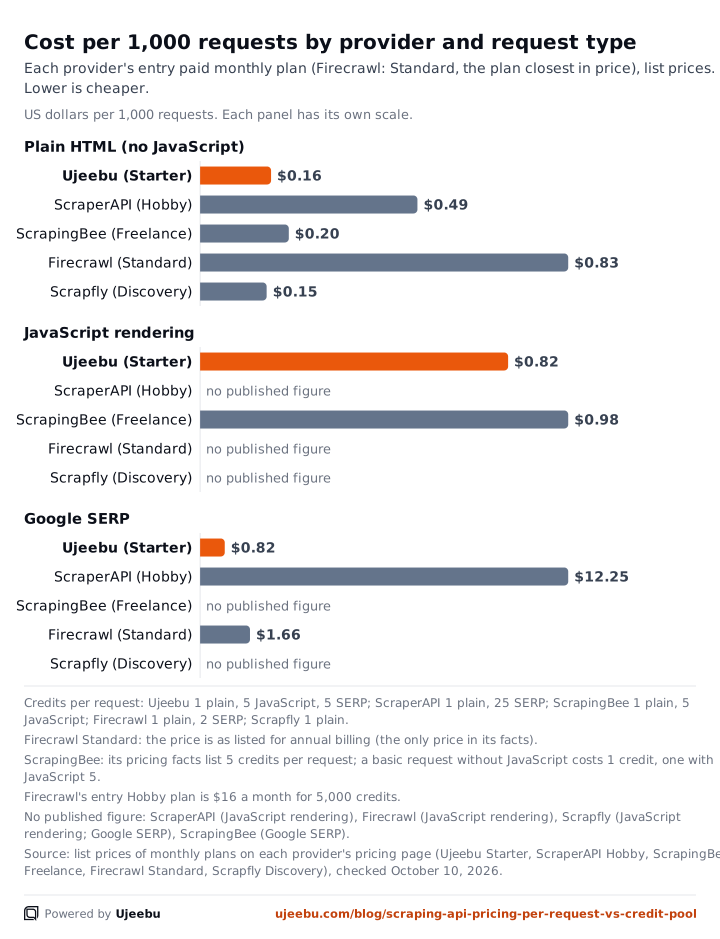
A few things stand out. For plain scrapes, Ujeebu and Scrapfly are close at the entry level, but Scrapfly's Discovery plan does not publish a separate JS-rendering credit cost in the pack, so the JS column is blank. For SERP requests, ScraperAPI charges 25 credits per Google SERP request, which makes SERP-heavy workloads significantly more expensive on that platform compared to providers that price SERP at a lower credit multiple. ScrapingBee does not offer a SERP endpoint, so that cell is also blank.
The chart illustrates a pattern worth remembering: providers that price SERP requests at a high credit multiple make mixed workloads expensive fast. If your pipeline combines page scraping with keyword or ranking lookups, the SERP credit cost often dominates the total bill.
Rule of thumb: if more than 10% of your requests are SERP lookups, calculate the SERP cost separately before comparing plans. It will matter more than the plain-scrape rate.
Capacity pricing: when paying for slots makes sense
Capacity pricing works like renting a fleet of delivery vans: you pay for the vehicles whether they are on the road or parked. The monthly fee is fixed; the effective cost per delivery depends entirely on how hard you run the fleet.
Web Scraper Scale's Fast mode is estimated at $0.047 per 1,000 URLs at full utilization; FullJS mode at $0.091 per 1,000 URLs at full utilization, both calculated as the $200 monthly fee divided by the estimated URL throughput. Those are competitive rates, but only at full utilization. At 100,000 URLs processed on a $200/month plan, the effective rate rises to $2 per 1,000; at 1,000,000 URLs it falls to $0.20 per 1,000.
Capacity pricing suits teams running steady, high-volume recurring collection where slots stay busy around the clock. It is expensive for sporadic or experimental workloads that leave slots idle. Web Scraper's smaller Cloud plans charge monthly URL-credit allowances rather than capacity slots, so the same brand offers both models depending on the tier. One processed page uses one credit regardless of how many rows it yields, which is a separate consideration from the capacity model.
If your scraping is bursty or you are still exploring which sites to target, a credit pool gives you more predictable spend than a capacity plan.
Run your workload through every model before you commit
The only reliable way to compare scraping API pricing is to run your specific workload through each provider's credit math. Here is a worked example for a realistic mixed workload: 50,000 plain scrapes, 10,000 JavaScript scrapes, and 5,000 SERP requests per month.
| Provider | Plain scrapes (50k) | JS scrapes (10k) | SERP (5k) | Total credits | Fits which plan? |
|---|---|---|---|---|---|
| Ujeebu | 50,000 cr (1 cr each) | 50,000 cr (5 cr each) | 25,000 cr (5 cr each) | 125,000 cr | Starter (300k cr, $49/mo) |
| ScraperAPI | 50,000 cr (1 cr each) | 50,000 cr (5 cr each) | 125,000 cr (25 cr each) | 225,000 cr | Exceeds Hobby (100k cr); needs Startup ($149/mo) |
| Firecrawl | 50,000 cr (1 cr each) | unknown (JS not separately priced in published data) | 10,000 cr (2 cr each) | 60,000 cr + JS | Standard (100k cr, $83/mo) may fit depending on JS cost |
ScraperAPI charges 25 credits per Google SERP request, which makes SERP-heavy workloads expensive on that platform. The same 5,000 SERP requests cost 25,000 credits on Ujeebu and 10,000 on Firecrawl; the right choice depends on how SERP-heavy your workload is relative to plain scrapes.
For sites with aggressive bot protection, see the proxy and anti-bot documentation.
Tracking credit consumption in your code
Understanding the pricing model is one thing; seeing the credit cost of each call in your own pipeline is another. Every Ujeebu response includes a Ujb-Credits header that tells you exactly how many credits that request consumed. Reading it in code closes the loop between the pricing table and your actual spend.
The examples below show a plain scrape and a JavaScript scrape side by side, then an /account call to check your remaining balance. Run them against your real target URLs to measure your workload's credit burn before you choose a plan.
# Plain scrape (1 credit): check the Ujb-Credits header
curl -i -X GET 'https://api.ujeebu.com/scrape?url=https://scrape.li/quotes/' \
  -H "ApiKey: YOUR_API_KEY" 2>&1 | grep -E "Ujb-Credits|HTTP/"

# JavaScript scrape (5 credits): same page, JS rendering enabled
curl -i -X GET 'https://api.ujeebu.com/scrape?url=https://scrape.li/quotes/&js=true' \
  -H "ApiKey: YOUR_API_KEY" 2>&1 | grep -E "Ujb-Credits|HTTP/"

# Check remaining balance and usage
curl -X GET 'https://api.ujeebu.com/account' \
  -H "ApiKey: YOUR_API_KEY"
import requests

API_KEY = "YOUR_API_KEY"
TARGET = "https://scrape.li/quotes/"

def scrape_and_report(params, label):
    r = requests.get(
        "https://api.ujeebu.com/scrape",
        params={"url": TARGET, **params},
        headers={"ApiKey": API_KEY},
    )
    credits_used = r.headers.get("Ujb-Credits", "n/a")
    print(f"{label}: HTTP {r.status_code}, credits used: {credits_used}")
    return r

scrape_and_report({}, "Plain scrape (1 cr)")
scrape_and_report({"js": "true"}, "JS scrape (5 cr)")

# Check account balance and quota
account = requests.get(
    "https://api.ujeebu.com/account",
    headers={"ApiKey": API_KEY},
).json()

print(f"Plan: {account['plan']}")
print(f"Used: {account['used']} / {account['quota']} credits ({account['used_percent']:.1f}%)")
print(f"Next billing: {account['next_billing_date']} ({account['days_till_next_billing']} days)")
The Ujb-Credits header is the only cost header Ujeebu returns; it reflects the actual credit cost of that specific call, including any premium proxy or JS-rendering multiplier. The /account endpoint returns your quota, how much you have used, and when your credits reset, which is enough to build a simple budget guard into any scraping pipeline. If used_percent crosses a threshold you set, you can pause low-priority jobs and preserve credits for higher-value requests.
For a deeper look at how proxy type and JS rendering interact with credit costs, the Scrape API docs list every parameter and its effect on billing.
How Ujeebu's credit model works in practice
Each Ujeebu endpoint has a fixed per-request credit cost, and plan credits can be used across all endpoints: Scrape API, SERP API, Markdown API, and Extract API. That means a team running mixed workloads does not need to pre-allocate budget per endpoint or manage separate quotas. Failed requests are not billed; only successful calls and 404 responses consume credits.
For sites that render content client-side, the JavaScript scrape is the only route that returns usable data, so the 5-credit cost is not optional. For static pages, the 1-credit plain scrape is sufficient. Knowing which sites in your target list require JS rendering before you budget is the single most important input to your cost estimate.
The free trial includes 5,000 credits with no credit card required, which is enough to run the plain-versus-JS comparison above across your actual target sites and measure your real credit burn rate before you choose a plan. Start the free trial and see the full pricing page for plan details and the Scrape API docs for the complete parameter reference.
For a broader comparison of scraping APIs by capability and cost, see the best web scraping APIs guide and the web scraping API pricing overview. If you are evaluating specific competitors, the ScraperAPI vs Scrapfly comparison walks through how their credit models differ in practice.
FAQ
What is the difference between per-request and credit-pool pricing for scraping APIs?
Per-request pricing charges a rate for each API call, but that rate often varies by request type (plain HTML, JavaScript rendering, premium proxy). A credit pool is a pre-purchased block where each request type has a fixed credit cost; you spend from the same balance regardless of which endpoint or configuration you use. The practical difference is flexibility: a credit pool lets you shift spend between request types mid-month without changing your plan.
How do I calculate which scraping API pricing model is cheapest for my workload?
Count your expected monthly requests by type (plain HTML, JS-rendered, SERP, markdown, and so on). Multiply each type by the credit cost on each platform you are evaluating. Sum the credits, then find which plan tier covers that total. Compare the plan costs across providers. The cheapest plan is the one whose credit costs match your actual workload mix, not the one with the lowest headline rate.
Does Ujeebu charge for failed scraping requests?
No. Ujeebu only bills successful calls and 404 responses. Timeouts, blocks, and other errors do not consume credits. This matters on sites with aggressive bot protection, where a platform that bills any 200 response will charge you even when the response contains a CAPTCHA or consent wall rather than usable data.
When does a capacity-based scraping plan save money over a credit pool?
A capacity plan saves money when you can keep the concurrent scraper slots busy around the clock, because the effective cost per URL falls as utilization rises. At full utilization, capacity plans can reach very low per-URL rates. They become expensive when scraping is sporadic or experimental, because you pay the fixed monthly fee regardless of how many URLs you actually process.
What counts as a billable success on a scraping API?
It varies by provider. Some charge only when the response contains valid content; others charge on any HTTP 200 response, even if that response is a CAPTCHA page or a consent wall; others charge when a document is returned regardless of content quality. Always confirm exactly what triggers a credit deduction before committing to a plan, especially if your target sites use soft-block techniques that return 200 responses with no usable data.
How can I monitor credit usage programmatically?
Every Ujeebu response includes a Ujb-Credits header with the exact credit cost of that call. To check your overall balance and quota at any time, call GET https://api.ujeebu.com/account with your API key; the response includes used, quota, used_percent, and days_till_next_billing. Polling this endpoint at the start of each pipeline run lets you gate expensive JS-rendered requests when your balance is running low.
Try it yourself
Run this on your own pages
Get a free API key and make your first call in minutes. 5,000 free credits for 7 days, no card.